Rollator vs Knee Walker: What Is the Difference? (November 2026)
A rollator supports walking with both feet, while a knee walker supports one bent knee as the other leg pushes. Choose based on whether you need everyday walking support or a way to move while keeping an injured foot or ankle off the ground.
On this page (6 sections)
A rollator supports walking with both feet, while a knee walker supports one bent knee as the other leg pushes. Choose a rollator for everyday walking support and seated breaks, or consider a knee walker for movement during some foot or ankle recoveries.
The main difference is how each aid supports your body. A rollator has a frame, handles and wheels, while a knee walker has a padded platform for one bent knee, handlebars and wheels.
That difference shapes how you move through a room and how you rest. A rollator stays in front of you as you walk behind it, and a knee walker carries the injured leg while you steer from a standing position.
It also shapes who each aid suits in daily life. A rollator fits someone who can bear weight through both legs but wants steady frame support, brakes and often a seat for a break.
A knee walker fits a much narrower situation. It may suit a recovery plan where one foot or ankle must stay off the ground, but only when the knee can safely rest on a platform and the other leg can push.
Your balance, the surface you use it on and your clinician's instructions all matter. A device that feels steady on a flat indoor floor may feel very different on a ramp, a wet path or a thick rug.
Fit matters just as much as the basic style. Handle height, seat or platform height, braking controls and turning space all affect whether you can use the aid without bending, twisting or straining.
If you need a general walker for seniors, compare the different frame styles before choosing.
That comparison should start with support, not extras. A seat, pouch or basket only helps if the main way the aid holds and moves with you is right for your body and your route.
Setup and care also play a part from the start. Check that brakes work, wheels turn freely, adjustment points are secure and any seat, backrest or platform is fitted as the instructions describe.
Keep the whole picture in mind before you decide. Everyday walking support and recovery support solve different problems, and choosing the wrong style can make simple trips harder, not easier.


Rollator vs knee walker: how does each one support you?
A rollator helps you walk with both feet; a knee walker lets you rest one knee while you move with the other leg. They serve different needs, so one isn't a direct substitute for the other.
With a rollator, you hold the handles and walk behind the frame. Many models have hand brakes, and some include a seat for a rest while stopped.
With a knee walker, your injured leg rests on a padded platform with the knee bent. You steer with the handlebars and push along with the other leg, which needs to bear weight as allowed by your care plan.
What does a rollator do?
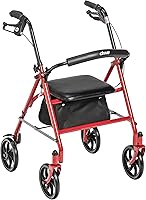
A rollator is a wheeled walker that supports you as you walk. The Drive Medical Rollator Walker with Seat pairs a steel frame with 7.5-inch wheels, ergonomic handles, hand brakes and a padded seat.
The VOCIC Z21 adds 8-inch wheels, adjustable handle and seat heights, and three brake modes. Its seat height adjusts among 3 levels, while the handles adjust among 5 levels.
A rollator can suit someone who walks with both feet but wants a frame to hold, a seat for breaks or a pouch for personal items. Read our guide to the best rollator walker for seniors to compare more rollator features.
What does a knee walker do?
A knee walker supports one bent knee on a cushioned platform while you move with your other leg. Both examples here are steerable and have brakes, but their adjustment and storage features differ.
The BodyMed has a collapsible design, a cushioned pad, dual rear brakes and adjustable steering and knee pad columns. The KneeRover KneeCycle has a tie-rod steering mechanism, a rear drum brake, a basket and an adjustable knee platform.
A knee walker may fit some recovery plans for foot or ankle injuries. It isn't right for every injury, and it requires balance, steering and enough strength in the leg doing the pushing.
Which should you choose for everyday walking?
Choose a rollator if you need support while walking with both feet and want features such as a seat or storage pouch. A knee walker is built around a bent knee and movement with the other leg, rather than everyday walking support.
A rollator's handles give you a place to hold while moving forward. Its brakes can help control speed and lock the frame when you stop, but follow the model's instructions for braking and sitting.
A seat is useful only when you can stop, lock the brakes and sit down safely. Don't use the seat as a place to ride while the rollator is moving.
Think about where you walk. The Drive Medical model has 7.5-inch wheels, while the VOCIC Z21 has 8-inch wheels and describes its tires as puncture-proof; wheel size alone doesn't guarantee a smooth or safe trip over every surface.
If your main concern is the kind of walker frame, compare options in our guides to the u step walker vs rollator and the hemi walker vs rollator. Those choices also depend on the support you need and how you move.
When might a knee walker fit a recovery plan?
A knee walker may be an option when your care plan allows your knee to rest on a platform and your other leg to push. Ask your clinician before using one, especially after surgery or a serious injury.
The BodyMed is described as an alternative to crutches for foot or ankle injuries. The KneeRover is described for recovery from broken foot, ankle or leg injuries and foot or ankle surgery.
Those descriptions don't mean a knee walker is suitable for your specific injury. Your clinician can explain whether pressure on the knee is allowed and whether your other leg can safely carry the pushing load.
What should you check before using one?
Check whether you can keep the injured leg on the platform without pain or unwanted pressure. Ask about weight-bearing limits, balance, turning and what to do on slopes or uneven ground.
Practice turning and stopping in a clear, level area if your clinician says the device is appropriate. Keep the speed slow and use the brakes as directed.
The KneeRover maker recommends a safe walking speed of less than 3 mph. That is guidance for this model, not a guarantee that every route or user can travel safely at that speed.
Which features matter most before you buy?
Match the aid's support style, fit and brakes to your needs before comparing extras. A seat or basket only helps if the device is appropriate and comfortable for you.
For a rollator, check handle height, seat height, width, folded size and brake controls. Measure doorways and storage areas first.
Handle height affects posture and whether you bend forward while walking. You should reach the handles without leaning or straining.
Seat height affects how safely you sit down and stand back up. Place both feet flat, lock the brakes and rise without pulling on the frame.
For a knee walker, check platform and handlebar ranges, brakes, turning space and folded design. Confirm the platform fits your leg position.
Platform height and handlebar height must work together. If one is too high or low, you may lean or twist to steer and stop.
The BodyMed has adjustable steering and knee pad columns, plus detachable parts. The KneeRover lists a 16 to 22.5-inch platform and a 34.5 to 41.5-inch handlebar.
The BodyMed description recommends users between 4 feet 9 inches and 6 feet 4 inches tall. The KneeRover lists 4 feet 9 inches to 6 feet 6 inches.
Even within a listed range, comfort depends on knee position, reach and strength in the pushing leg. Check your own measurements against each range.
The VOCIC Z21 offers seat adjustment among 3 levels from 20 to 22 inches. Its handles adjust among 5 levels from 31.5 to 36.6 inches, and it folds to 31.5 by 23.6 by 13.8 inches.
The Drive Medical rollator offers a height adjustment lever, ergonomic handles and a fold-down backrest. It measures 25.5 by 23.5 by 31 inches and weighs 20 pounds.
Brakes deserve close attention in daily use. A rollator brake should control speed while walking and lock when you sit.
A knee walker brake should help you stop and hold position, so test the controls in a clear area before relying on them.
Weight matters when you lift and carry a device. The Drive Medical weighs 20 pounds, the VOCIC Z21 about 22 pounds, the BodyMed 27.05 pounds and the KneeRover 24.35 pounds.
The Drive Medical lists a 350-pound capacity, and the VOCIC Z21 recommends users at 350 pounds or less. The KneeRover and BodyMed each list up to 300 pounds.
Treat capacity as one part of the decision, alongside fit and balance. Before use, check that frames are locked, fasteners secure, wheels turn freely and brakes work.
What are the main trade-offs between the two?
A rollator is made for walking with both feet; a knee walker can reduce the need to step on one foot when a care plan allows it. Each requires different balance and movement.
A rollator takes up space in front of you and must be guided while walking. Its seat helps during a break, but you must stop and lock the brakes before sitting.
That seat is only for stationary rest, not riding. Sitting and standing still need both feet on the ground and the frame held steady.
A knee walker also takes up space and needs room to turn. Your other leg must push, and the bent-knee position may not suit every injury.
That pushing action is the key trade-off. It can keep pressure off an injured foot, but asks more of the other leg, your balance and your steering.
A knee walker may feel hands-free when stopped, which can help with doors and daily tasks. Moving still needs attention when turning or slowing on a slope.
A rollator asks for different attention. You guide it from behind, watch the path ahead and use brakes to manage speed, while both feet walk.
Comfort differs in a similar way. A rollator seat gives a place to pause on longer outings, while a knee walker platform supports the knee during movement.
Consider your home layout and regular routes. Thresholds, rugs, tight turns, stairs and outdoor slopes can change how manageable either device feels.
Narrow hallways and doorways can be a problem for both styles. Measure your home, then plan where you will turn, park, fold and lift the aid.
The Drive Medical has 7.5-inch wheels, the VOCIC Z21 has 8-inch wheels and the KneeRover has 7.5-inch wheels. Wheel size alone does not make a route safe.
Surface, slope, weather and your balance matter more than a wheel measurement. Avoid routes you cannot control at a slow, steady pace.
Storage and transport are trade-offs too. A folding rollator may suit a car trunk or closet, while a knee walker with detachable parts may suit a car or spare room.
Weight and lifting strength shape that choice. Even a few pounds matter when you lift a device into a vehicle or move it into storage.
Neither aid removes the need for care and checking. Check brakes, wheels, fasteners and any seat or platform before use and keep them clean and secure.
Choose the style that matches your legs, balance and usual route, not the one with more extras.
Which mobility aid should you choose?
Choose a rollator for walking support with both feet, and consider a knee walker only when your care plan allows the bent-knee position and pushing action. Fit, balance and route should guide the final choice.
The Drive Medical rollator suits buyers who want a padded seat, locking brake and under-seat pouch. The VOCIC Z21 adds larger 8-inch wheels and several seat and handle adjustments.
The Drive Medical uses a steel frame with a padded seat, fold-down backrest and 7.5-inch wheels. Its under-seat pouch keeps small essentials close during travel or errands.
The VOCIC Z21 offers a seat with 3 levels, handles with 5 levels and three brake modes. Its maker describes the tires as puncture-proof and the front wheels as 360-degree rotating.
The BodyMed and KneeRover are knee walker options for people whose recovery plan supports that style. Compare the BodyMed collapsible frame and dual rear brakes with the KneeRover adjustable platform, tie-rod steering and basket.
The BodyMed has a cushioned knee pad, adjustable steering and knee pad columns and detachable parts for storage. It is described as an alternative to crutches for some foot or ankle injuries.
The KneeRover KneeCycle has tie-rod steering, an adjustable locking handbrake and a rear drum brake. Its maker recommends a safe walking speed of less than 3 mph.
Before choosing either style, check whether you can turn, stop and sit or stand safely in your own space. A short practice in a clear, level area can show whether fit and controls feel manageable.
Ask your clinician if you are unsure which style fits your condition. That is especially important after surgery, a fracture or a serious injury.
If you are also comparing powered mobility, our guides to 3-wheel and 4-wheel mobility scooters and scooters and electric wheelchairs explain those distinct choices.
Those powered options are separate from rollators and knee walkers. They do not replace the need to match your aid to walking support or to a recovery plan.
In short, let your body and care plan lead. A rollator makes sense for walking with both feet, while a knee walker only makes sense when the bent-knee position and pushing action are allowed.
Frequently asked questions
Can a rollator replace a knee walker?
A rollator doesn't replace a knee walker when you need to keep an injured foot or ankle off the ground. A rollator supports walking with both feet, while a knee walker lets you rest one bent knee on a padded platform and push with the other leg.
Ask your clinician which aid fits your injury.
Is a knee walker the same as a rollator?
No. A rollator is a wheeled walking aid with handles and often a seat; a knee walker has a knee platform and handlebars for steering.
The BodyMed and KneeRover examples are designed around one bent knee, while the Drive Medical and VOCIC models are rollators for walking with both feet.
Can you sit on a rollator seat while moving?
No. A rollator seat is for resting while stationary, with the brakes locked according to the device instructions.
It isn't a riding seat.
Keep both feet on the ground when sitting down or standing up, and ask for help if you can't do so safely.
Can you use a knee walker outdoors?
Some knee walkers are described for indoor and outdoor use, including the BodyMed model, and the KneeRover has 7.5-inch wheels for indoor and outdoor use. Surface, slope, balance and your clinician's instructions still matter.
Avoid routes you can't control safely.
How do I choose between a rollator and a knee walker?
Choose a rollator if you need wheeled support while walking with both feet and would use features such as a seat. Consider a knee walker only if your recovery plan allows you to bear weight through one knee and push with the other leg.
A clinician can help match the aid to your condition.